 English
  Italiano

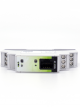
WiFi – Serial RS485 Converter
MDB-W is a bidirectional converter between the WiFi communication channel and the RS232 and RS485 serial channels. This WiFi-serial communication bridge therefore allows all devices equipped with a serial port to communicate with software or electronic boards based on IP communication and sharing a LAN network with WiFi. Easily programmable thanks to a dedicated app and WiFi interface, it does not require any additional software for configuration. A dedicated app allows you to read, modify, and set all device parameters. The galvanic isolation of the serial ports ensures protection for all connected instruments and guarantees isolation from the rest of the system.
MDB-W main features are:
| GENERAL FEATURES | ELETCTRICAL FEATURES |
| WiFi 802.11 b/g/n, WPA, WPA2, WPS | 10-32 v DC power supply |
| Opto-isolated RS485 port (1200-115200bps) | Average absorption <: 1,5W |
| DIN rail mount | Operating temperature: -20°C ÷ +60°C |
| Frontal signalling LEDs | Storage temperature: -40°C ÷ +80°C |
| Dimensions: 90 x 17 x 60 mm (1 DIN module) | Relative humidity: 0 to 80% without condensation |
| CE certification (EN 61000-6-2,EN 61000-6-4 Standards) |
This WiFi-to-serial converter has the following functions:
- WiFi – RS485
- WiFi – RS232
- RS232 – RS485
Ideal as a converter for the ModBus protocol.
Specially designed for industrial environments, equipped with an extended 10-30Vdc power supply, and with protection on the serial port thanks to galvanic isolation.
- App
- Firmware
- Documentation
You can download iBridge from this page:
From this page, you can download the latest MDB-W firmware version:

